더보기
더보기
11-13 코드 정리
import numpy as np
import matplotlib.pyplot as plt
from scipy.signal import hilbert

file_path = r"./data/PhantomData/uri_SpV1556_VpF192_FpA343_20071121103247.rfd"


DATA_OFFSET = 22410 + 8      # '00db' 위치 + 태그/길이(8바이트)
VECTOR_HEADER = 32           # per vector 헤더
SAMPLES = 1556               # 실제 유효 샘플 수
VECTORS = 192
BYTES_PER_SAMPLE = 2


with open(file_path, "rb") as f:
    f.seek(DATA_OFFSET)
    raw = np.frombuffer(f.read(), dtype="<i2")   # Little endian int16


samples_per_vector = SAMPLES + VECTOR_HEADER
frame_size = samples_per_vector * VECTORS


frame1 = raw[:frame_size].reshape((samples_per_vector, VECTORS), order="F")
frame1 = frame1[VECTOR_HEADER:, :]  # 헤더 제거


analytic1 = hilbert(frame1, axis=0)
envelope1 = np.abs(analytic1)
bmode1 = np.log10(envelope1 + 1e-3)

frame2 = raw[frame_size*1:frame_size*2].reshape((samples_per_vector,VECTORS), order='F')
frame2 = frame2[VECTOR_HEADER:, :]
analytic2 = hilbert(frame2, axis=0)
envelope2 = np.abs(analytic2)
bmode2 = np.log10(envelope2+ 1e-3)

plt.figure(figsize=(12,5))
plt.subplot(1,2,1)
plt.imshow(bmode1, cmap="gray", aspect="auto")
plt.title('Frame 1')
plt.xlabel('Vector (channel)')
plt.ylabel('Depth (sampels)')
plt.colorbar()

plt.subplot(1,2,2)
plt.imshow(bmode2, cmap="gray", aspect="auto")
plt.title("Frame 2")
plt.xlabel("Vector (channel)")
plt.ylabel("Depth (samples)")
plt.colorbar()

plt.tight_layout()
plt.show()
데이터 잘라내는데 귀찮아서 머리를 안썼다.
좀 더 깔끔한 코드로 내일 정리해야지
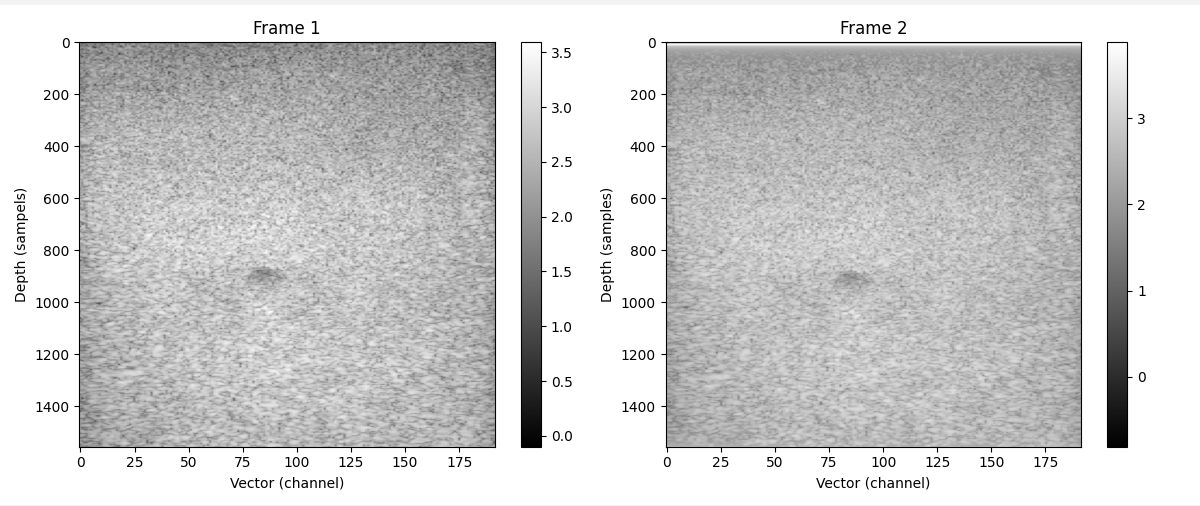
코드를 더 정리했다.(11월 14일)
더보기
더보기
import numpy as np
import matplotlib.pyplot as plt
from scipy.signal import hilbert

file_path = r"./data/PhantomData/uri_SpV1556_VpF192_FpA343_20071121103247.rfd"


DATA_OFFSET = 22410 + 8      # '00db' 위치 + 태그/길이(8바이트)
VECTOR_HEADER = 32           # per vector 헤더
SAMPLES = 1556          # 실제 유효 샘플 수
VECTORS = 192
BYTES_PER_SAMPLE = 2
FRAME = 343


with open(file_path, "rb") as f:
    f.seek(DATA_OFFSET)
    raw = np.frombuffer(f.read(), dtype="<i2")   # Little endian int16


samples_per_vector = VECTOR_HEADER + SAMPLES
frame_size = samples_per_vector * VECTORS
whole_frame_size = frame_size*FRAME
print(VECTORS*FRAME)
print(len(raw)/frame_size)
#frame whole
frametrim = raw[:whole_frame_size] # sampels_per_vector * VECTORS * 343
framewh = frametrim.reshape((samples_per_vector ,VECTORS * FRAME), order ='F')
framewh = framewh[VECTOR_HEADER:, :]


def nthFrame(n):
    return framewh[:,VECTORS*(n - 1): VECTORS*(n)]

frame1 = nthFrame(1)
analytic1 = hilbert(frame1, axis=0)
envelope1 = np.abs(analytic1)
bmode1 = np.log10(envelope1 + 1e-3)


n_th_frame = int(input('몇번째 프레임을 추출하나요?: ' ))
# n_th_frame = 3
frameN = nthFrame(n_th_frame)
analytic_N = hilbert(frameN,axis=0)
envelope_N = np.abs(analytic_N)
bmode_N = np.log10(envelope_N + 1e-3)

plt.figure(figsize=(12,5))


plt.subplot(1,2,1)
plt.imshow(bmode1, cmap="gray", aspect="auto")
plt.title("Frame 1")
plt.xlabel("Vector (channel)")
plt.ylabel("Depth (samples)")
plt.colorbar()

plt.subplot(1,2,2)
plt.imshow(bmode_N, cmap="gray", aspect="auto")
plt.title(f'Frame {n_th_frame}')
plt.xlabel('Vector (channel)')
plt.ylabel('Depth (sampels)')
plt.colorbar()
plt.tight_layout()
plt.show()
사진 1의 Frame2를 보자 상단에 뭔가 하얀 선이 있지 않은가?
뭔가 이상해서 Frame13을 추출해 보았다.
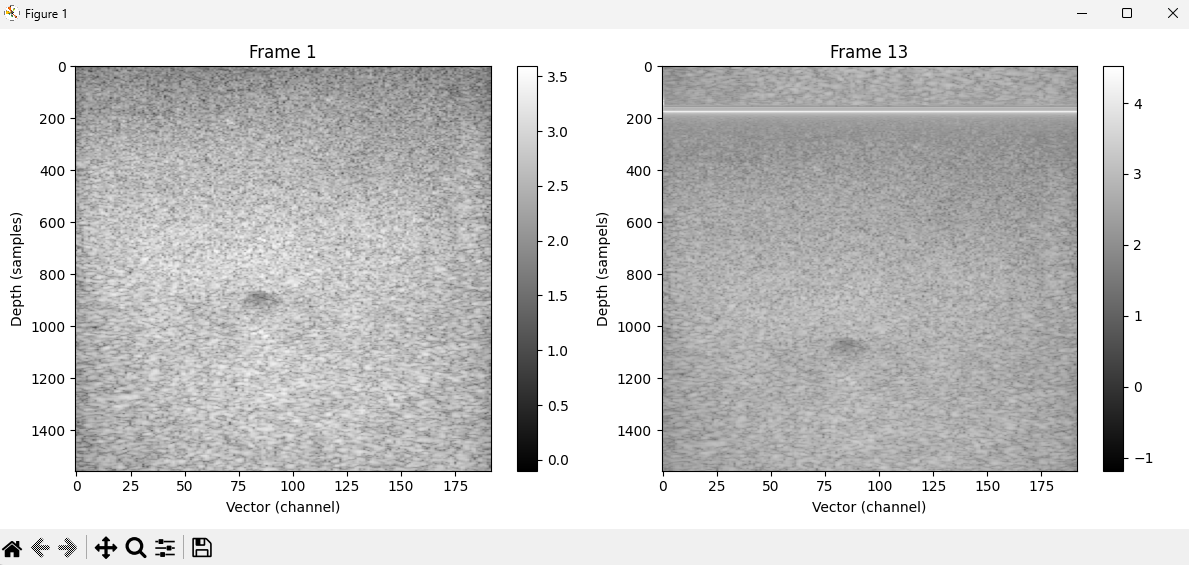
점점내려와서 고장난 TV 마냥 프레임이 떨어진다
하얀선은 padding인거같고
이런 현상은 frame drifting 이라고 한다.
padding: 데이터(사진)밑에 다른 데이터(사진)을 바로 붙이는게 아니라 약간의 여백을 준다.
padding이라는 표현은 통신 수업 들을때 들었어서 바로 이해가 되었다.
다음주나 주말에 이거 어떻게 처리해야할지 고민해봐야겠다.
'이직로그 > DSP' 카테고리의 다른 글
| 빔포밍 시뮬레이션 6 - 105 프레임 (0) | 2025.11.20 |
|---|---|
| 빔포밍 시뮬레이션 4 - Padding 분석하기 (0) | 2025.11.18 |
| 빔포밍 시뮬레이션 2 - 첫번째 프레임 이미지 처리 (0) | 2025.11.13 |
| 빔포밍 시뮬레이션 1 - 첫번째 프레임 찾기 (0) | 2025.11.12 |
| b-mode 에 관하여 (0) | 2025.11.06 |
